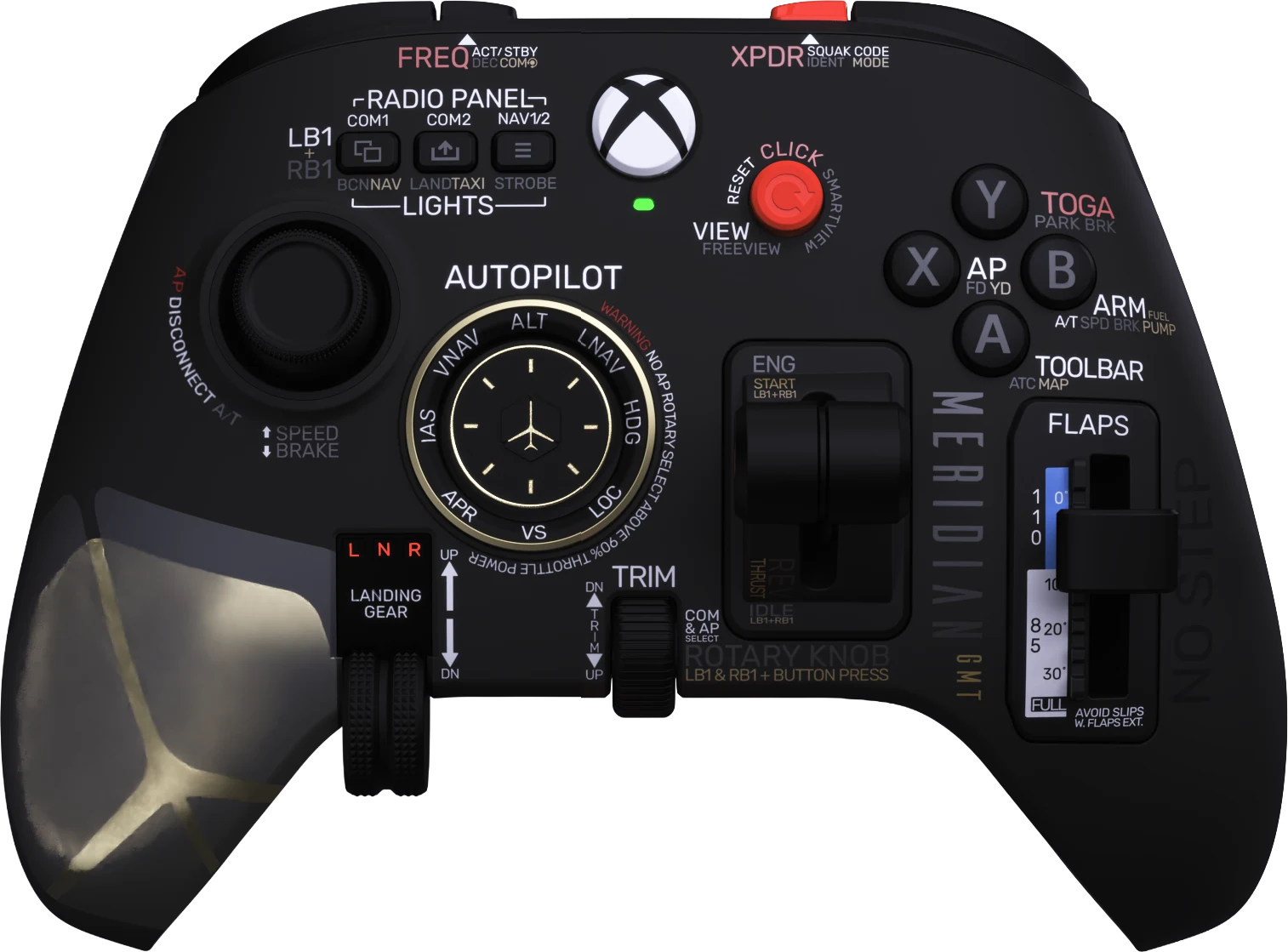
Wireless on Xbox and PC
2.4 GHz wireless on Xbox and PC, or plug in with USB-C. Up to 30 hours on a charge.


Meridian GMT
and

A wireless Xbox and PC controller with real flight levers.
2.4 GHz wireless on Xbox and PC, or plug in with USB-C. Up to 30 hours on a charge.
A Hall effect Flightstick, a view joystick, and analog grip triggers for rudder and brakes.

Four inserts in the box: General Aviation, Boeing, Airbus and Helicopter/Rescue.


Lift out the throttle, drop in the collective. Both ModulAIR modules come in the box.


Magnetic faceplates. Change the faceplate, module and flap insert to match what you fly.

Grip triggers under your fingers. A built-in battery that charges over USB-C.
Three layers. Hold LB, RB or both and every control does more.
Triggers and back buttons
Triggers and back buttons
Triggers and back buttons
| D-pad | Press | Hold LB + RB |
|---|---|---|
| Up | FD | No function |
| Up right | AP2 | No function |
| Right | APPR | VS Knob |
| Down right | ALT | ALT Knob |
| Down | A/THR | HDG Knob |
| Down left | LOC | No function |
| Left | SPD | IAS Knob |
| Up left | AP1 | No function |
| Control | Press | Hold LB | Hold RB | Hold LB + RB |
|---|---|---|---|---|
| Basic flight controls | ||||
| Flightstick | Pitch and roll | Speed Brake (Hold) | No function | No function |
| Module lever | Throttle with detents | No function | No function | No function |
| LT | Left Rudder | No function | No function | No function |
| RT | Right Rudder | No function | No function | No function |
| P3 | Left Diff Brake | No function | No function | No function |
| P4 | Right Diff Brake | No function | No function | No function |
| Flap lever | Flaps | No function | No function | No function |
| Gear lever | Gear Up/Down | No function | No function | No function |
| Trim wheel | Pitch Trim | Rudder Trim | No function | No function |
| View joystick | View | Freeview | No function | No function |
| View joystick click | Reset View | Smartview | No function | No function |
| Advanced features | ||||
| A | Toolbar | ATC Window | Map Window | No function |
| B | ENG Crank | ENG Norm | IGN Stat | No function |
| Y | ARM Speed Brake | Parking Brake | Auto Brake | No function |
| Menu 1 | INT/EXT View | VHF 1 Select | Beacon ON/OFF | NAV Light ON/OFF |
| Menu 2 | Take Photo/Video | VHF 2 Select | Landing ON/OFF | TAXI ON/OFF |
| Menu 3 | Pause | NAV1 | Strobe ON/OFF | NAV2 |
| Autopilot | ||||
| Flightstick click | AP Disc | AT Disc | No function | No function |
| COMMS | ||||
| X | PTT | ENG 1 ON/OFF | ENG 2 ON/OFF | No function |
| P1 | Set XPDR Code | IDENT | MODE SEL (Toggle) | No function |
| P2 | Swap ACT/STBY FREQ (with Menu 1, 2 or 3) | Decimal Swap (with Menu 1, 2 or 3) | COM/NAV Knob SEL (with Menu 1, 2 or 3) | No function |
| D-pad | Press |
|---|---|
| Up | ALT |
| Up right | LNAV |
| Right | HDG |
| Down right | LOC |
| Down | VS |
| Down left | APR |
| Left | IAS |
| Up left | VNAV |
| Control | Press | Hold LB | Hold RB | Hold LB + RB |
|---|---|---|---|---|
| Basic flight controls | ||||
| Flightstick | Pitch and roll | Speed Brake (Hold) | No function | No function |
| Module lever | Throttle | No function | No function | Reverse thrust axis |
| LT | Left Rudder | No function | No function | No function |
| RT | Right Rudder | No function | No function | No function |
| P3 | Left Diff Brake | No function | No function | No function |
| P4 | Right Diff Brake | No function | No function | No function |
| Flap lever | Flaps | No function | No function | No function |
| Gear lever | Gear Up/Down | No function | No function | No function |
| Trim wheel | Pitch Trim | Rudder Trim | No function | No function |
| View joystick | View | Freeview | No function | No function |
| View joystick click | Reset View | Smartview | No function | ENG Start |
| Advanced features | ||||
| A | Toolbar | ATC Window | Map Window | No function |
| Menu 1 | INT/EXT View | COM 1 | Beacon ON/OFF | NAV Light ON/OFF |
| Menu 2 | Take Photo/Video | COM 2 | Landing ON/OFF | TAXI ON/OFF |
| Menu 3 | Pause | NAV1 | Strobe ON/OFF | NAV2 |
| Autopilot | ||||
| X | Autopilot ON/OFF | Flight Director ON/OFF | No function | No function |
| B | Arm Auto Throttle | Arm Speed Brake | Yaw Damper | No function |
| Y | TOGA | Push to Talk | Parking Brake | No function |
| Flightstick click | AP Disc | AT Disc | No function | No function |
| COMMS | ||||
| P1 | Set XPDR Code | IDENT | MODE SEL (Toggle) | No function |
| P2 | Swap ACT/STBY FREQ (with Menu 1, 2 or 3) | Decimal Swap (with Menu 1, 2 or 3) | COM/NAV Knob SEL (with Menu 1, 2 or 3) | No function |
| D-pad | Press | Hold LB + RB |
|---|---|---|
| Up | ALT | ALT Knob |
| Up right | LNAV | CRS Knob |
| Right | HDG | HDG Knob |
| Down right | LOC | No function |
| Down | VS | VS Wheel |
| Down left | APR | No function |
| Left | IAS | IAS Knob |
| Up left | VNAV | No function |
| Control | Press | Hold LB | Hold RB | Hold LB + RB |
|---|---|---|---|---|
| Basic flight controls | ||||
| Flightstick | Cyclic | Speed Brake (Hold) | Flaps (Hold) | No function |
| Module lever | Collective | No function | No function | No function |
| LT | Left Rudder | No function | No function | No function |
| RT | Right Rudder | No function | No function | No function |
| P3 | Left Diff Brake | No function | No function | No function |
| P4 | Right Diff Brake | No function | No function | No function |
| Flap lever | Rescue Hoist Up/Down and Water Release/Scoop | No function | No function | No function |
| Gear lever | Gear Up/Down | No function | No function | No function |
| Trim wheel | Throttle | Pitch Trim | Rudder Trim | No function |
| View joystick | View | Searchlight | Precision View | No function |
| View joystick click | Reset View | Smartview | No function | No function |
| Advanced features | ||||
| A | Toolbar | ATC Window | Map Window | No function |
| Y | Toolbar | ATC Window | Map Window | No function |
| Menu 1 | INT/EXT View | InterCOM | COM1/COM2 SEL | No function |
| Menu 2 | Take Photo/Video | ENG Start | ENG Stop | No function |
| Menu 3 | Pause | Taxi/Landing lights ON/OFF | Position ON/OFF | Anti Collision ON/OFF |
| P1 | Parking Brake | Rotor Brake | No function | No function |
| P2 | Rotor Assist | Cyclic Assist | No function | No function |
| Autopilot | ||||
| B | Autopilot ON/OFF | Flight Director ON/OFF | No function | No function |
| X | Auto Hover | Yaw Damper | PTT | No function |
| Flightstick click | AP Disc | Door/Exit | No function | No function |

Controller with the aircraft faceplate

Rescue helicopter faceplate

Throttle module

Collective module

General Aviation flap insert

Boeing flap insert

Airbus flap insert

Helicopter and rescue insert
Also in the box: the 2.4 GHz wireless dongle and a USB-C to USB-A cable. The traditional single-axis throttle module is not included.
PowerA bring years of experience building controllers.
It will be sold by MeridianGMT on this website, by our distributors, and by PowerA and their partners.
The Wireless Flightdeck is coming soon. It will be sold by MeridianGMT on this website, by our distributors, and by PowerA and their partners. Sign up on PowerA's Meridian page to hear when it becomes available.
Yes. Wireless Flightdeck works with Xbox Series X and Xbox Series S. Horizon Plus and Latitude Plus are for Windows PCs, with partial Mac support at launch.
Yes, through the 2.4 GHz dongle in the box. The same dongle works on Windows PCs, and on both platforms you can also plug in with the USB cable.
The Wireless Flightdeck has full support in Microsoft Flight Simulator 2024. Other titles, such as Microsoft Flight Simulator 2020 and X-Plane, have generic support.
Yes. Put on the helicopter faceplate and fit the collective, which comes in the box. For aircraft, swap in the throttle, which is also included.
The analog grip triggers control the rudder and differential braking, so you can taxi and fly coordinated turns without pedals.
LB and RB. Hold LB, RB or both, and each control takes on another function. The full list for every profile is in the controls section.
No. The battery is built in and recharges over USB-C. It does not take AA or AAA batteries.
The controller, two faceplates (aircraft and rescue helicopter), a throttle module, a collective module, four flap lever inserts (General Aviation, Boeing, Airbus and Helicopter/Rescue), a 2.4 GHz wireless dongle and a USB-C to USB-A cable. The traditional single-axis throttle is not included.
Launch updates come from PowerA's Meridian page.